
Disclosure: GoetheCoach is our product. Everything below is shown with real output from the app, and we say where ChatGPT is the better choice. GoetheCoach is not affiliated with the Goethe-Institut or OpenAI.
The short answer
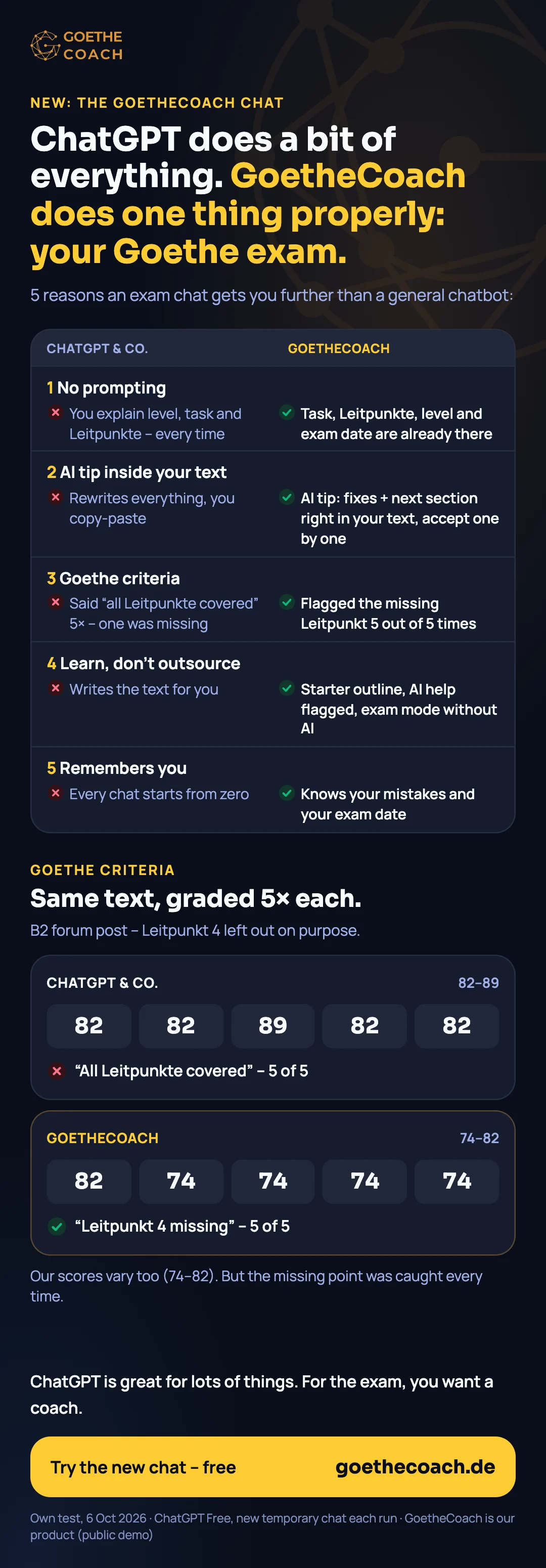
| ChatGPT and other general chatbots | The new GoetheCoach chat | |
|---|---|---|
| Context | You explain level, task and Leitpunkte, every time | Task, Leitpunkte, level and your exam date are already in the chat |
| Your text | Rewrites everything; you copy and paste | KI-Tipp writes each fix into your draft; you accept or reject it |
| Goethe criteria | In our test it said "all Leitpunkte covered" 5 times, though one was missing | Flagged the missing Leitpunkt 5 out of 5 times |
| Learning | Writes the text for you | Starter outline, AI help marked in the evaluation, exam mode without AI |
| Memory | Every chat starts from zero | Knows your typical mistakes and plans the weeks up to your exam |
1. No prompting: the task is already in the chat
To get useful feedback from ChatGPT you first have to write a long prompt: your level, the task, all four Leitpunkte, the minimum word count, how the exam is graded. Forget one of them and the feedback drifts. In our ChatGPT test that prompt was a full paragraph before the text even started.
In GoetheCoach you pick a task and the chat already knows it: the text type, the register, the four Leitpunkte and the word target. Your exam level and date from the onboarding questionnaire are there too, so every answer refers to your exam, not to German in general.
2. KI-Tipp: corrections inside your text, not a rewrite
Ask ChatGPT to improve your text and it hands you a new one. It reads better, but you do not see what changed, and the next time you make the same mistakes.
The KI-Tipp works the other way round. You write; when you get stuck, you press KI-Tipp and the suggestions appear inside your own draft, each one marked:
- green, "Correction": a real mistake, e.g. die einem ständig stören → die einen ständig stören (stören takes the accusative)
- blue, "Better": correct, but better at your level, e.g. Meiner Meinung nach sollte Homeoffice … möglich sein → Ich bin der Meinung, dass Homeoffice … möglich sein sollte
- red, "Remove": something that does not belong in the exam text
- yellow, "Next section": a short continuation, usually for the Leitpunkt you have not covered yet
You accept or reject each suggestion with ✓ or ✕. The chat only says why, in one short line per change, so you are not reading a wall of text while you write. The examples above are the real KI-Tipp for a B2 forum post about working from home.
Every suggestion is checked a second time in its full sentence before you see it, and wrong German is dropped. It is still a practice tool: read what you accept.
Video transcript (German)
ChatGPT schreibt deinen ganzen Text neu. Und was hast du dabei gelernt? Im neuen GoetheCoach-Chat schreibst du selbst. Hängst du fest: KI-Tipp. Die Vorschläge stehen direkt in deinem Text. Grün: ein Fehler. Blau: geht besser. Gelb: der nächste Abschnitt. Warum, steht kurz im Chat. Und du entscheidest: übernehmen – oder verwerfen. Teste den neuen Chat kostenlos: goethecoach Punkt de.
3. Goethe criteria: does the text answer every Leitpunkt?
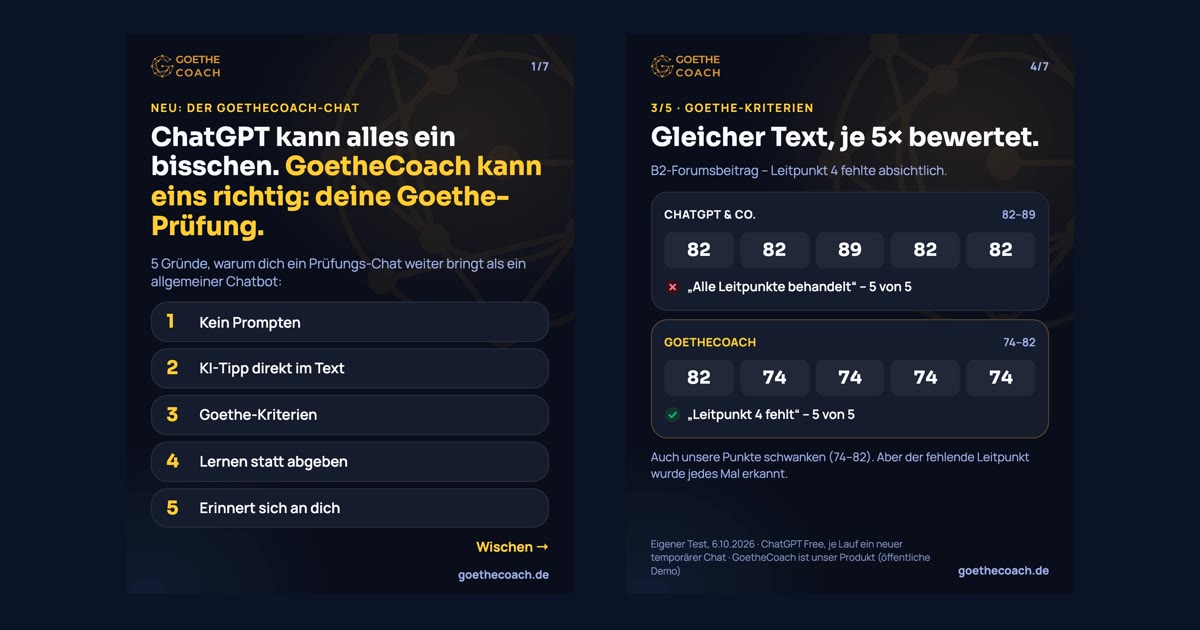
The most expensive mistake in Goethe Schreiben is not grammar, it is a missing Leitpunkt. In our Leitpunkte study Leitpunkt 4 was missing in 46% of B2 texts.
We gave ChatGPT the same B2 text five times, with Leitpunkt 4 left out on purpose. It scored the text 82 to 89 and said all Leitpunkte were covered in every run. GoetheCoach flagged the missing point in all five runs. Our scores varied too (74–82), so this is not a claim of perfect grading, but the gap that costs the most points was found every time. Full protocol: ChatGPT vs GoetheCoach.
In the chat, the same knowledge shows up while you write: the KI-Tipp names the Leitpunkt that is still missing and offers the next section for it.
4. Learn, don't outsource
ChatGPT will happily write the whole forum post for you. In the exam you sit there with paper, pen and 75 minutes (B2), and no chatbot.
GoetheCoach helps you start without writing for you:
- Starter outline: an empty editor shows one sentence starter per Leitpunkt (Meiner Meinung nach …, Man könnte einwenden, dass …, Eine Alternative wäre …). The text is still yours.
- AI help stays visible: parts you took over from the KI-Tipp are marked in the evaluation, so you know what you wrote yourself.
- Exam mode: the simulation runs with the real time limit and without KI-Tipp, like on exam day.
5. It remembers you
A general chatbot starts every conversation from zero. The GoetheCoach chat builds a learner profile from your evaluated texts: which mistakes come back (word order, cases, commas, missing Leitpunkte) and which part of Schreiben is your weakest. From that it suggests short drills of one to five minutes on exactly those mistakes, and a week-by-week plan up to your exam date.
When ChatGPT is still the better choice
- Explaining grammar in your language, as often as you want.
- Speaking practice (Sprechen) in voice mode. GoetheCoach covers Schreiben only.
- Vocabulary and texts outside the exam, e.g. for work or everyday life.
Use both: ChatGPT for explanations, an exam chat for the texts you will actually be graded on.
How to practise with the new chat
- Fill in the short onboarding questionnaire (level, exam date, goals).
- Pick a Schreiben task; the chat shows it with its Leitpunkte.
- Start writing; the outline helps if the page is blank.
- Stuck? Press KI-Tipp and decide on each suggestion.
- Submit for an evaluation by the Goethe criteria.
- Do the suggested drills, then finish with the exam simulation.
Frequently Asked Questions
Is ChatGPT good for Goethe exam preparation?
For explanations and speaking practice, yes. As a writing grader it is less reliable: in our test it missed an absent Leitpunkt in 5 of 5 runs and rewrote texts instead of correcting them.
Does the KI-Tipp write my text for me?
No. It corrects inside your draft and suggests at most a short next section. You accept or reject each change, and AI help is marked in the evaluation.
Is the AI feedback the same as a Goethe examiner's grade?
No. Only Goethe-Institut examiners grade the exam. GoetheCoach gives a practice estimate by the official criteria and checks every Leitpunkt.
What does it cost?
Your first 10 evaluations are free, and the drills are free up to a daily limit. More is available through a membership.
Does it work on the phone?
Yes. On a computer the chat and your text sit side by side; on the phone you switch between the "Tutor" and "My text" tabs.
Try the new chat
Pick a Schreiben task, write it yourself and get the KI-Tipp right inside your text. Your first 10 evaluations are free.
Start free